Back to engineering projects
// PRJ_005 · Workplace Engineering

Workplace
Engineering Portfolio.

A collection of small, high-leverage engineering wins from on-the-job problem solving — custom 3D-printed tools, ergonomic shop fixtures, and software automation that took multi-day calibration tasks down to under an hour.

Context
Industry · workplace engineering
Disciplines
CAD · 3D print · LabVIEW · Excel
Role
Sole designer / builder
Output
Four shipped solutions
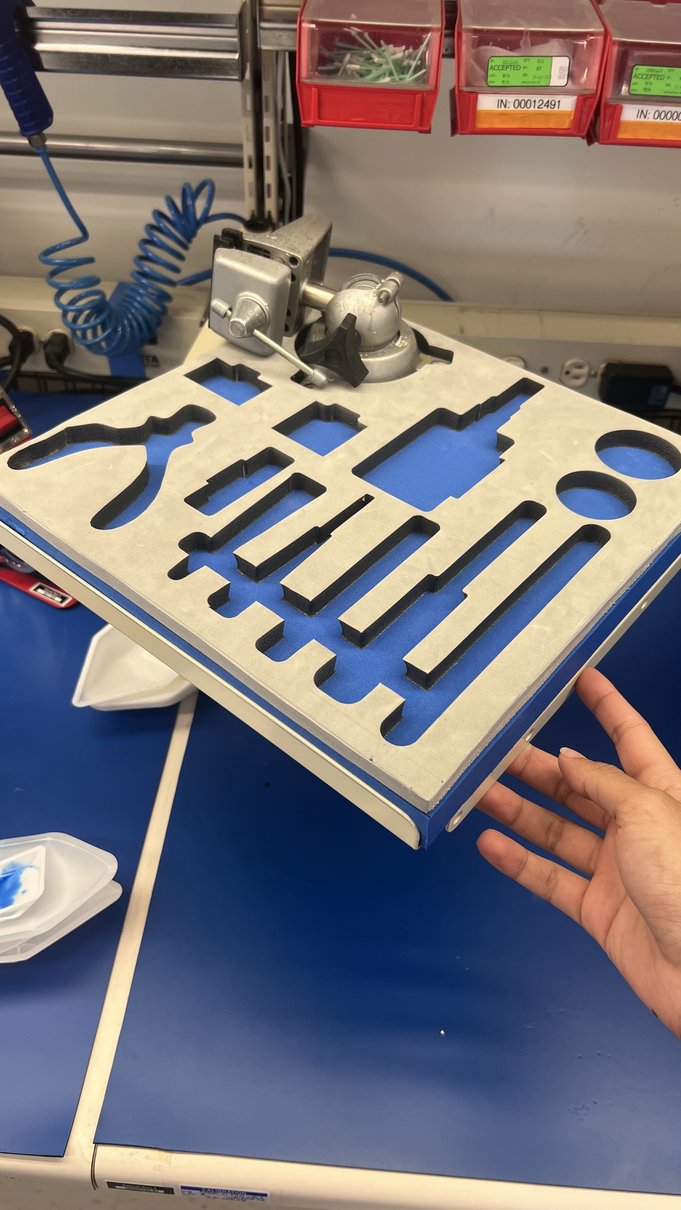
A laser-cut foam tool holder with custom-cut tool silhouettes
// Custom foam tool holder · in-hand
Calibration time
2 days → 1 hr LabVIEW automation
Data points
180 → 1000+ per calibration
Custom tools
3D printed OnShape · iterated
Cards analyzed
~50 Excel-based ranking
// 01 — Overview

Small problems. Real impact.

The most useful engineering doesn't always come from a course brief. These four projects were initiated and delivered in a working environment — each one solving a recurring annoyance, calibration bottleneck, or ergonomic risk that the production workflow faced daily. Each made my coworkers' day a little better and saved measurable time.

// 01 / Custom Tool Design

Custom lid opener for oil cans

The shop's oil cans had slippery, hand-unfriendly lids. After a few too many frustrated coworkers, I took measurements directly off the can, modeled a custom wrench in OnShape, and 3D-printed a prototype.

The first revision opened the cans cleanly on the first try. To speed up tolerance testing between revisions, I cut quick-check templates on the laser cutter before printing. The final printed tool is now permanently on the shop bench.

OnShapeCAD
3D PrintPrototype
Laser CutTolerance check
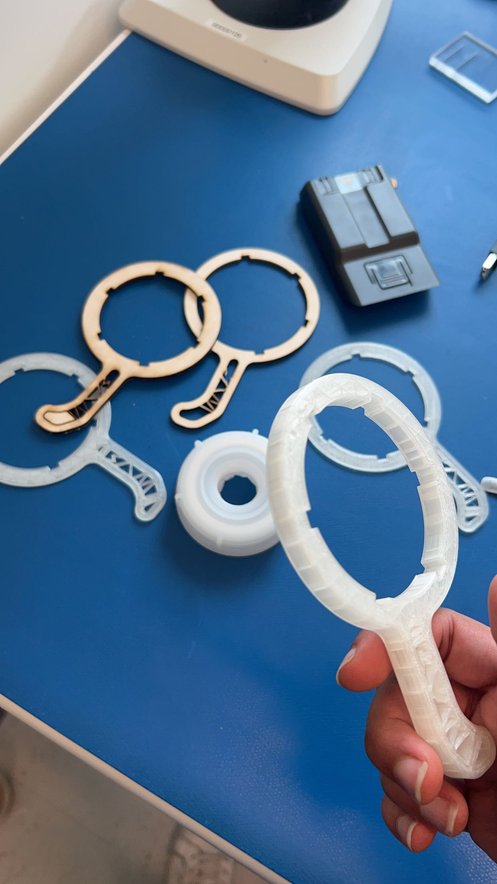
3D-printed custom lid opener wrenches
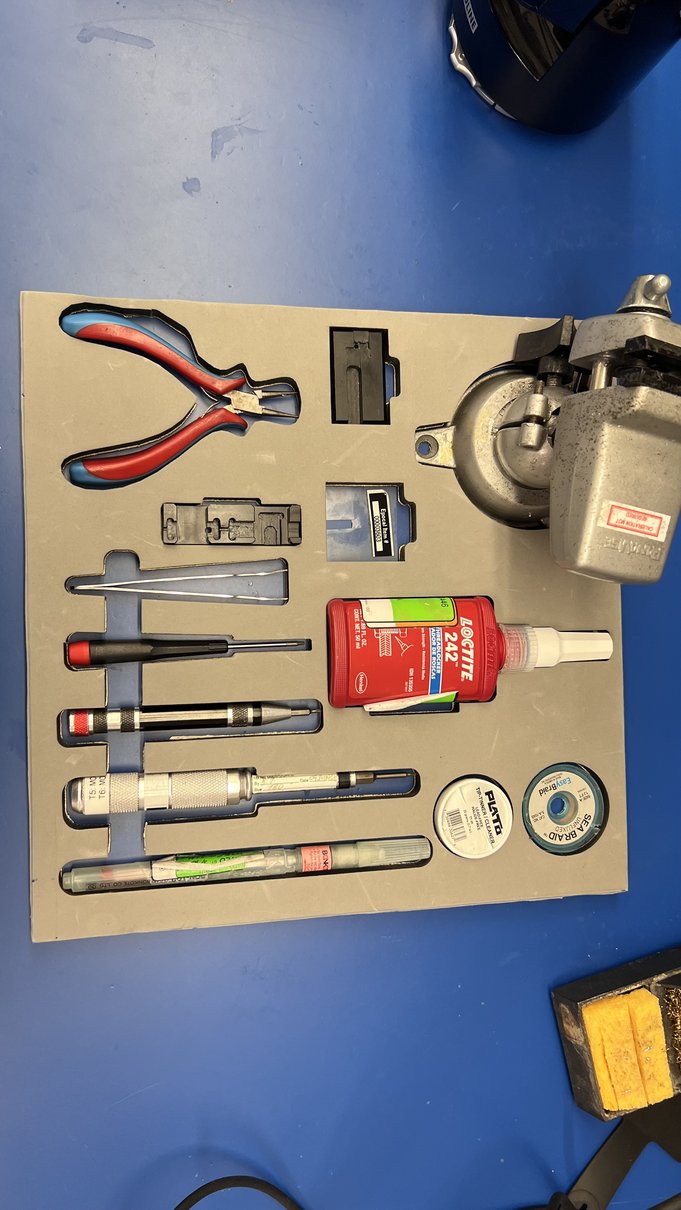
Foam tool holder with custom-cut tool silhouettes
// 02 / Shop Ergonomics

Ergonomic tool holder with extension arm

Shop tools were getting lost between drawers and rolling carts. I photographed each tool to capture its precise contour, traced them in OnShape, and laser-cut the silhouettes into a top foam layer with a solid backing layer underneath to stop tools dropping through.

A pivoting extension arm gives the operator reach without moving the whole unit. Each tool now has a permanent home, and inventory checks are a glance instead of a hunt.

OnShapeTrace from photos
Foam layersDrop-proof
Extension armReach
// 03 / Test Automation

LabVIEW automation for thermal card calibration

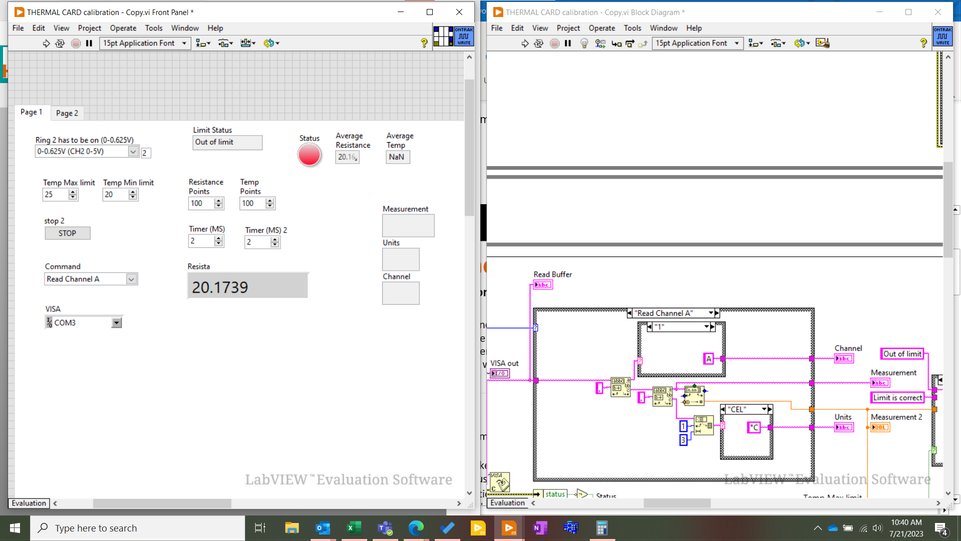
The existing calibration procedure took two full days: manually recording 180 data points across multiple temperature setpoints. It was slow, prone to transcription errors, and a known time sink for the lab.

I wrote a LabVIEW program that drives the calibration instrument, captures over 1,000 data points per run, averages them, and writes the result to a clean record. The two-day procedure now finishes in about an hour with better statistical reliability than the manual flow ever delivered.

2 days → 1 hrCycle time
1000+ ptsvs 180 manual
LabVIEWStack
LabVIEW thermal card calibration front panel and block diagram
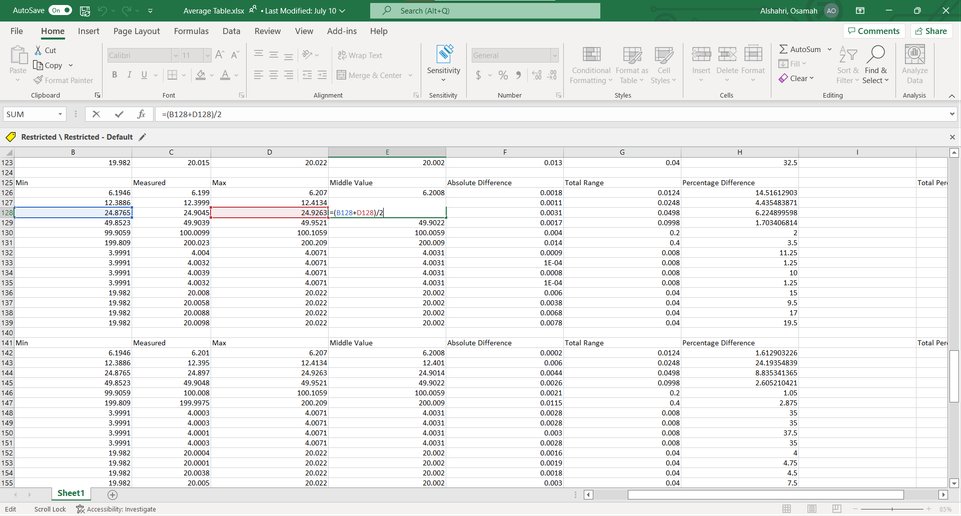
Excel spreadsheet with calibration metrics across many cards
// 04 / Data Analysis

Calibration analysis of card measurements

For an investigation, I needed to find the most "centrally calibrated" card out of about 50 candidates. Manual ranking would have been brittle, so I modeled the comparison in Excel using formulas that captured each card's minimum, measured, and maximum values.

Middle Value = (Min + Max) / 2, Absolute Difference = ABS(Measured - Middle Value), Total Range = Max - Min, then Percentage Difference = (Absolute Diff / Total Range) × 100. Sorting on the percentage metric immediately surfaced the best-centered card and made the ranking defensible in the report.

~50 cardsAnalyzed
ExcelStack
RankedOutcome
// 02 — Pattern

Notice friction, build the fix.

Each of these started with the same instinct: spot a recurring annoyance, ask whether ten minutes of CAD or a short LabVIEW program could remove it, and then go build it. The lesson I took away was that the highest-leverage engineering at work is rarely the most ambitious — it's the steady drip of small, well-aimed solutions that compound into a much better day-to-day.

What I lean on

  • OnShape for fast browser-based parametric CAD
  • Laser cutter for low-cost geometric checks before committing to a print
  • LabVIEW when the task is "automate the instrument and log everything"
  • Excel for quick, transparent ranking and statistical comparisons

What worked across all four

  • Measure first, model second — every project started from the real artifact
  • Iterate physically before going digital-only — quick prints catch mistakes
  • Make the result obvious to non-engineers (clean foam cuts, plain Excel columns)
  • Hand the tool over and walk away — if people use it without me, it shipped

Extra shop shots.